Using your personal mobile for business might seem like the easy option at first, but it doesn't take long for the lines between your work and private life to blur. More than that, it can give off a slightly amateur impression. The answer? A dedicated UK business phone number for WhatsApp Business. It’s a simple change that professionally separates your work from your personal life, builds brand credibility, and funnels all your customer conversations into one powerful platform.
Why a Dedicated WhatsApp Number Is a Business Asset
In today's world, customers expect fast, easy ways to get in touch. Relying on your personal mobile for business doesn't just feel unprofessional; it's a missed opportunity to build a solid brand identity from the very first "hello." A dedicated business number tells potential customers you’re a serious, established company they can trust.
This one switch unlocks the real power of the WhatsApp Business platform, turning it from just another messaging app into a cornerstone of your customer service and marketing. It’s not just about having a separate number—it’s about creating a dedicated, professional space where your customers feel valued.
Building Immediate Credibility and Trust
Put yourself in a customer's shoes for a moment. Which feels more trustworthy: a random mobile number or a proper business line? UK business phone numbers, like a local 0161 for a Manchester plumber or a national 0333 for an online store, immediately project legitimacy.
In the UK, the type of number you choose is a strategic decision. It's fascinating, but businesses with local area codes often see around 27% more calls from people in their area compared to those using generic numbers. A local number builds a sense of community and trust, which is absolutely vital for service businesses. If you want to dive deeper into how number choice can affect customer behaviour, these insights on business telephony from callin.io are well worth a read.
The key takeaway is that your phone number directly shapes how people perceive your brand. It's often the very first piece of contact information a customer sees, making that professional first impression absolutely critical.
Centralise Communication and Improve Efficiency
Having one number for all your WhatsApp business chats keeps every customer enquiry in one organised place. No more vital messages getting buried between personal texts and group chat notifications.
Once everything is funnelled into a single hub, you can start using the clever features that make WhatsApp Business so effective:
- Automated Greetings: Welcome new customers the moment they message you, making them feel seen and valued.
- Quick Replies: Set up pre-written answers for common questions to save yourself a huge amount of time.
- Away Messages: Let customers know your business hours so they're not left wondering when you'll reply.
This organised system doesn't just make your own life easier; it gives your customers a much smoother and more professional experience. With that sorted, you're ready to get your number set up.
Choosing the Right UK Number for Your Business
Picking a phone number for your business is more than just ticking a box on your to-do list. It’s a genuine branding decision. Think of it as your digital front door – the number you choose affects how customers find you, perceive your business, and, crucially, how you connect with them on WhatsApp. Not all UK business phone numbers are created equal, and your choice should reflect whether you're aiming to be a local hero or a national player.
For most businesses I work with, a VoIP (Voice over Internet Protocol) number is the way to go. Forget old-school landlines tied to a physical socket in the wall. VoIP numbers are digital, meaning they live on the internet and aren't attached to a specific phone or SIM card. This flexibility is exactly what makes them perfect for getting verified on WhatsApp Business and managing conversations from your existing mobile or computer. It's a much smoother process.
This image gives you a good sense of how simple the setup can be. It’s not some massive technical challenge.
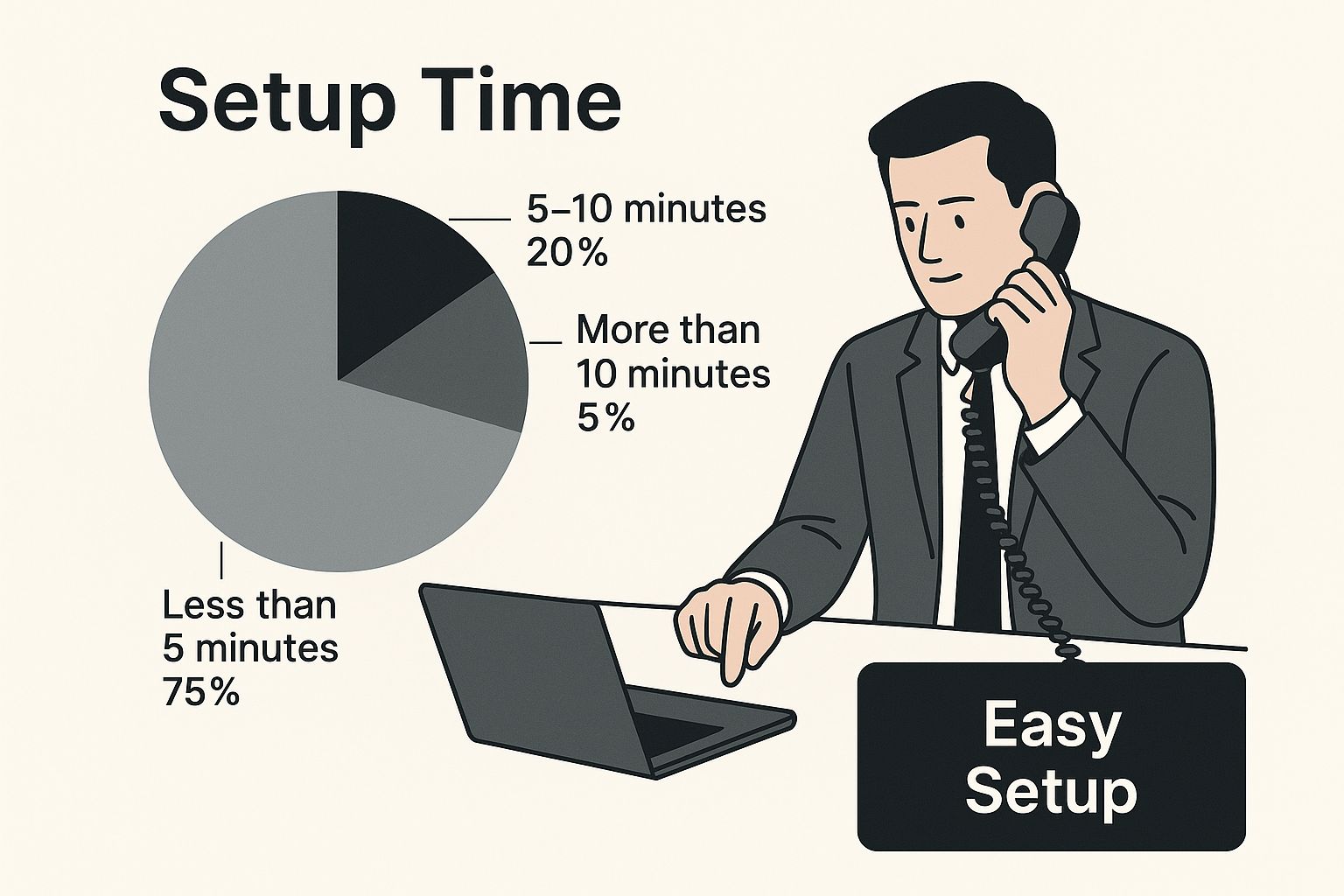
The key takeaway here is that getting a dedicated number is an accessible step for any business owner, not a complex hurdle reserved for big corporations.
Local, National, or Mobile: What's the Right Fit?
When you dive into the world of VoIP, you’ll find a few different flavours of numbers available. Each one sends a slightly different message to your potential customers.
To make it clearer, here’s a quick comparison of the main options and how they stack up for WhatsApp Business.
Comparing UK Business Number Types for WhatsApp
| Number Type | Example Prefix | Best For | Key Advantage for WhatsApp |
|---|---|---|---|
| Geographic | 0161 (Manchester) |
Local service providers (plumbers, cafes, solicitors) | Builds instant local trust and makes you feel part of the community. |
| National | 0333 |
E-commerce, consultants, UK-wide service businesses | Projects a professional, nationwide presence from day one. |
| Mobile | 07... |
Sole traders, freelancers, personal brands | Feels approachable and direct, but can blur personal/professional lines. |
Let's break these down a bit further.
-
Geographic Numbers (01/02 Prefixes): These are your classic local numbers, like 0161 for Manchester or 020 for London. They’re absolutely brilliant if your business serves a specific community. Think of a local bakery, a trusted plumber, or a high-street solicitor. Seeing a local area code immediately builds familiarity and trust.
-
National Numbers (03 Prefixes): Prefixes like 0333 aren't tied to any city or town. This makes them ideal for businesses that operate across the whole of the UK, such as e-commerce stores or national consultancies. A great bonus is that calls to 03 numbers cost the same as a standard landline call for your customers, even when they're calling from a mobile.
-
Mobile Numbers (07 Prefixes): You can use a dedicated 07 mobile number, but I often advise against it unless it fits a very specific brand image. While it might feel more personal and direct for a freelancer, it can sometimes come across as less established. For most businesses, a geographic or national number just looks more professional.
So, it really boils down to your brand identity. Ask yourself this one simple question: "Do I want to be the trusted local expert, or the go-to national provider?" Your answer will point you straight to the right type of number.
Meeting the Needs of UK Businesses
There's a massive demand for flexible and affordable communication tools in the UK. As of early 2024, the country is home to around 5.5 million private sector businesses. What’s truly remarkable is that a staggering 99.9% of them are small to medium-sized enterprises (SMEs).
These are the businesses that form the backbone of the British economy, and they need tools that are powerful yet don't break the bank. You can dig deeper into these figures with some fascinating UK business statistics on money.co.uk. This SME-heavy landscape is precisely why VoIP has become such a perfect fit for the modern British business.
A Practical Guide to Setting Up WhatsApp Business
Right, you’ve got your new UK business phone number. Now for the fun part: getting it hooked up to WhatsApp so you can start talking to customers. The process itself is pretty straightforward, but a few insider tips, especially around verification, can save you a lot of hassle.
First things first, you need the right app. Head over to your phone's app store and search for WhatsApp Business. It's a separate application from the personal one you probably use every day. Don't skip this; the business version is packed with features designed specifically for commerce, and it's completely free to download.
Once installed, the app will walk you through the initial permissions and terms of service, much like the standard WhatsApp.
Getting Verified (The Important Bit)
This is the one step where people sometimes get stuck, especially when using a virtual or VoIP number. When you punch in your new business number, WhatsApp will attempt to send a six-digit code via SMS. Of course, since your number isn't tied to a physical SIM card, you won't get that text message in the traditional sense.
No need to panic. This is standard procedure, and any good VoIP provider will have you covered. You'll typically have one of two options:
- SMS-to-Email: Many providers will just forward any SMS sent to your number straight to your email inbox. A quick check of your email is all it takes to find the code.
- VoIP App or Dashboard: Other services might display incoming texts directly within their mobile app or your online account dashboard.
If neither of those works, there's a simple, foolproof backup. After the initial SMS attempt fails, WhatsApp displays a timer. Let it run down, and you’ll see the magic option appear: “Call me”. This is your best friend when verifying a VoIP number.
When you tap "Call me," an automated call will be placed to your new business number. Just answer it via your VoIP app or softphone, and a voice will read out the six-digit code. It's a clever workaround that completely bypasses the need for an SMS.
Polishing Your Business Profile
With the verification code entered, you're in! The app will now prompt you to build out your business profile. This is your digital shopfront, so it’s worth spending a few minutes getting it right.
You'll be asked for the basics:
- Your Business Name: Keep it clear and professional; this is what your customers will see first.
- A Profile Picture: Your company logo is the obvious and best choice here.
- Your Business Category: Pick the industry that best fits what you do.
That initial setup is just the beginning. You can—and absolutely should—go back in later to add more detail, like your physical address, website, and opening hours.
Connecting a dedicated business line to a platform as ubiquitous as WhatsApp is a massive advantage, especially in a market like the UK. Think about it: there are around 88.4 million active mobile connections in the country. With 99.4% of those being 3G, 4G, or 5G capable, the infrastructure is perfectly suited for the data-rich features WhatsApp Business offers. If you're interested in the broader context, some of the UK digital insights on datareportal.com are quite revealing. This high level of connectivity makes pairing a VoIP number with WhatsApp a truly effective strategy for any modern UK business.
Making Your WhatsApp Profile Work for You
So, you’ve got your new UK business phone number sorted and verified on WhatsApp. That's a huge first step, but don't pop the champagne just yet. Now comes the important part: transforming that blank profile into a professional, welcoming front door for your business.
Think of it this way: your WhatsApp profile is the first thing a potential customer sees. A half-finished profile with missing information can feel a bit dodgy. It might sound dramatic, but building trust is critical in a digital world. A polished profile instantly signals you're the real deal.
Nail Your Business Description
First things first, let's look at your business description. This is more than just a box to tick; it’s your chance to tell people what you're all about and what makes you stand out from the crowd.
Don't just write "Plumber in Bristol." That’s a missed opportunity. Instead, try to capture your unique value. Something like this works much better: "Your friendly, reliable Bristol plumber for boiler repairs and emergency call-outs. We offer transparent pricing and a 24/7 service, ensuring your home is always warm and safe." See the difference? It's not just what you do, but how you do it, and it cleverly weaves in keywords customers are likely to search for.
Your business description is your digital elevator pitch. It needs to quickly tell a potential customer who you are, what you offer, and why they should pick you over anyone else. Make every word count.
After you've perfected your description, go through and meticulously fill in every single field. It’s a simple task, but it speaks volumes about your legitimacy and attention to detail.
- Opening Hours: This is a must. It manages expectations and stops people from getting frustrated when they can't get an immediate reply.
- Physical Address: Even if you're an online-only business, adding your registered address adds a significant layer of credibility.
- Website Link: An easy win. Funnel interested customers directly to your site to learn more or make a purchase.
- Email Address: Offer another way for people to get in touch for more formal enquiries.
Set Up Your Mini-Storefront with the Product Catalogue
One of the best features for building trust and actually driving sales is the product catalogue. This tool turns your WhatsApp profile from a basic contact card into a dynamic, interactive shop window.
Here, you can add your key products or services, complete with high-quality images, clear descriptions, prices, and even product codes. Imagine a local bakery showcasing its best-selling cakes, or a freelance graphic designer listing their logo design and branding packages. It's incredibly versatile.
The real magic here is how easy it makes things for your customers. They can browse your offerings and tap to enquire about a specific item, all without ever leaving the chat. It removes friction and makes it dead simple for someone to go from browsing to buying. A well-stocked, professional-looking catalogue shows you’re serious, organised, and ready for business.
Automate Like a Pro: Greetings, Away Messages & Quick Replies
Your profile is looking sharp and your UK number is verified. Now for the fun part: making WhatsApp Business work for you. We're going to set up a few key features that act like a smart, switched-on assistant, handling customer chats efficiently and professionally.
These aren't just fancy add-ons. They're genuinely powerful tools for managing customer expectations and saving you a huge amount of time. You’ll be able to give every single person a prompt, helpful response, even when you’re out of the office or busy on a job. It’s how you turn a simple messaging app into a proper customer service powerhouse.
Your Digital Handshake: Setting Up a Greeting Message
First up is the Greeting Message. Think of this as your virtual front door. It’s the very first message someone sees when they contact you for the first time, or if it's been more than 14 days since your last chat. It's your chance to make a brilliant first impression.
Don't just settle for a bland, "Thanks for your message." Let's make it work a bit harder.
Imagine you're a local electrician. A great greeting message could be a lifesaver for both you and your customer.
Example for a Local Electrician:
"Hi there! Thanks for getting in touch with SparkSafe Electrical. We've received your message and will get back to you within the hour. If this is an emergency, please call us directly on 0121 555 1234. For pricing, you can view our standard rates here: [link to your rates page]."
See what that does? It immediately confirms you've got the message, sets a clear expectation for a reply, and even offers a solution for urgent problems or common questions.
Managing After-Hours Enquiries with Away Messages
You can't be on call 24/7, and nobody expects you to be. That's where an Away Message comes in. It automatically replies to messages you receive outside of your set business hours. This small touch is crucial—it stops potential customers from feeling ignored and shows you value their enquiry, even when you're off the clock.
For any business, setting clear boundaries is healthy. An Away Message reinforces your opening hours and can point customers towards helpful resources, making them feel looked after.
Let's say you run an e-commerce shop selling handmade crafts. Your Away Message can still be productive.
Example for an Online Store:
"Hello! You've reached us outside of our business hours (Mon-Fri, 9 am – 5 pm). We'll reply first thing tomorrow morning. In the meantime, you might find our FAQ page helpful for questions about shipping and returns: [link to your FAQ page]. Thanks for your patience!"
The Ultimate Time-Saver: Quick Replies
This feature is, without a doubt, the biggest time-saver in the app. Quick Replies are pre-written message templates you can save to answer your most common questions. Instead of typing the same answers over and over again, you just hit the forward-slash key (/) and a keyword. It’s that simple.
Think about the questions you get asked all the time. Here are a few real-world examples of how you could use Quick Replies:
- /prices: "You can find our full price list for all services on our website here: [link]. Let me know if you have any specific questions about our packages!"
- /location: "We're located at 123 High Street, Anytown, AB1 2CD. We're open from 9 am to 5 pm on weekdays. Hope to see you soon!"
- /booking: "To book an appointment, please use our online calendar here: [link]. You can see all available slots and confirm your booking in just a few clicks."
Setting these up from the get-go guarantees your responses are always fast, accurate, and consistent. It's a small effort that makes a massive difference to your customer service.
Got Questions About WhatsApp and UK Business Numbers? We’ve Got Answers
Even with a step-by-step guide, it's normal to have a few questions buzzing around your head. Setting up WhatsApp with a proper UK business number is pretty straightforward, but a few details can feel a bit tricky. Let's walk through some of the most common queries we hear from business owners just like you.
Think of this as your cheat sheet for sidestepping those little bumps in the road, so you can get your new comms channel up and running with total confidence.
Can I Actually Use My Existing UK Landline for WhatsApp Business?
Yes, you certainly can. It’s a very common request, but it requires a simple but clever workaround. Your standard BT landline can't receive text messages, which is how WhatsApp sends its verification code. So, how do you get around it?
The answer is a VoIP (Voice over Internet Protocol) service. A VoIP provider can take control of your existing landline number, essentially transforming it into a virtual number. Once that's done, you can receive the WhatsApp verification code as a phone call through a VoIP app or dashboard. It’s a reliable method many businesses use to keep their long-standing number.
What's the Real Difference Between the Free App and the API?
This is a brilliant question because it gets to the heart of who WhatsApp Business is for.
-
The WhatsApp Business App: This is the free version we've focused on in this guide. It's built for small businesses—think freelancers, local shops, or service providers. It lets you manage all your customer chats from one phone and gives you tools like a business profile and quick replies. It's incredibly powerful for its £0 price tag.
-
The WhatsApp Business API: This is the paid, heavy-duty version for larger companies. The API (Application Programming Interface) isn't an app you download; it's a gateway that connects WhatsApp to your other business software, like a CRM. It allows for multiple staff to handle messages, advanced chatbots, and sending automated notifications. It's a true enterprise solution.
For the vast majority of small and medium-sized UK businesses, the free app is more than enough. It packs all the features you need to look professional and communicate efficiently without any extra cost.
Will WhatsApp Ban My Account for Using a Virtual UK Number?
This is a common worry, but you can put it to rest. No, WhatsApp will not ban you just for using a virtual or VoIP number.
What WhatsApp really cares about is that you're using a legitimate phone number that can prove ownership by receiving their verification call or text. Bans are reserved for accounts that violate their terms of service—things like sending spam, unsolicited bulk messages, or engaging in fraudulent activity. The type of number you use isn't the problem; it's how you use it.
Ready to create a professional, private, and efficient communication channel for your business? At Business Numbers Direct, you can get a new virtual number set up for WhatsApp in under five minutes, all for just £7.99 per month with no contract. Separate your work and personal life today by visiting Business Numbers Direct.